Automated Deployment of a Go Web App on AWS EC2 with Daily Backups Using Ansible
From code to cloud: deploy a Go note-taking app on EC2 with Ansible, local SQLite data, and automated daily backups.
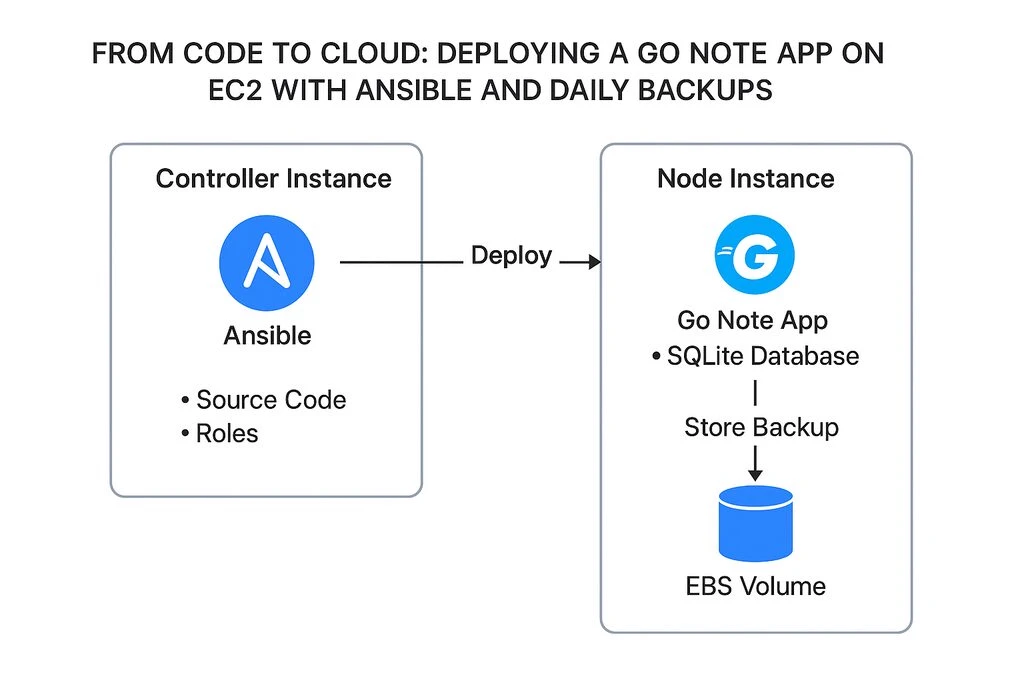
In this guide, we’ll walk through deploying a simple Go-based note-taking web app on AWS EC2, with a local SQLite database and daily backup automation using Ansible and cron. You’ll learn how to automate infrastructure, deploy cleanly with roles, and ensure your data is safely backed up using an attached EBS volume.
What You’ll Learn
-
How to deploy a Go web app using Ansible on AWS EC2
-
Managing deployments with Ansible roles
-
Automating backups using
cron -
Mounting and using an EBS volume for SQLite backups
Project Goals
-
Launch a web app written in Go
-
Use SQLite as the backend database
-
Automate app deployment with Ansible
-
Store daily database backups on an EBS volume mounted to the instance
Infrastructure Overview
EC2 Setup
-
Controller Instance:
-
Has Ansible installed
-
Stores the source code and roles
-
Executes deployment tasks remotely on the node
-
-
Node Instance:
-
Receives source code from controller
-
Runs the Go app
-
Hosts a mounted volume for backups (
/mnt/backup)
-
Directory Structure
note-app/
├── app/                   # Go source code
│   ├── main.go
│   └── go.mod
├── roles/
│   └── noteapp/
│       └── tasks/
│           └── main.yml  # Main Ansible task list
├── deploy-noteapp.yml     # Entry playbook
├── inventory.ini          # Ansible inventory with node IP
├── README.md              # Project readme
Role Tasks (main.yml)
- name: Ensure Go is installed
  yum:
    name: golang
    state: present

- name: Ensure app directory exists
  file:
    path: /home/ec2-user/note-app
    state: directory
    owner: ec2-user
    group: ec2-user
    mode: '0755'

- name: Upload Go app source
  copy:
    src: ./app/
    dest: /home/ec2-user/note-app/
    owner: ec2-user
    group: ec2-user
    mode: '0644'

- name: Initialize Go module
  command: go mod init noteapp
  args:
    chdir: /home/ec2-user/note-app

- name: Download dependencies
  command: go mod tidy
  args:
    chdir: /home/ec2-user/note-app

- name: Compile Go app
  command: go build -o noteapp main.go
  args:
    chdir: /home/ec2-user/note-app

- name: Run app in background using nohup
  shell: nohup ./noteapp > app.log 2>&1 &
  args:
    chdir: /home/ec2-user/note-app

- name: Ensure backup folder exists
  file:
    path: /mnt/backup
    state: directory
    owner: ec2-user
    group: ec2-user
    mode: '0755'

- name: Add daily SQLite backup cron job
  cron:
    name: 'Daily SQLite Backup'
    job: "cp /home/ec2-user/note-app/notes.db /mnt/backup/notes_$(date +\\%F).db"
    minute: '0'
    hour: '1'
Mounting the EBS Volume on Node
Format and Mount
sudo mkfs.ext4 /dev/xvdb
sudo mkdir -p /mnt/backup
sudo mount /dev/xvdb /mnt/backup
Persist the Mount with UUID
echo "UUID=$(sudo blkid -s UUID -o value /dev/xvdb) /mnt/backup ext4 defaults,nofail 0 2" | sudo tee -a /etc/fstabThen run:
sudo mount -aDeploying the App with Ansible
Run from controller
ansible-playbook -i inventory.ini deploy-noteapp.ymlAfter Deployment
-
App is compiled and running in the background
-
Accessible on port 80 of the node instance
-
SQLite DB is saved in the app directory
-
Cron job for backup is scheduled daily at 1:00 AM
Verifying the Deployment
Check if the app is running
sudo lsof -i :80Check logs
tail -f app.logView in browser
http://<public-ip> # or private IP if using a VPC and tunnel-
We used private ip method better because we dont need to change public ip everytime
-
Make sure controller and node are both in same vpc and security group
Testing the Backup
Checking the cron job
crontab -l- Make sure its in sudo mode , because we use become:true in ansible playbook
Check the backup files
ls /mnt/backupExpected :
notes_2025-08-05.dbTroubleshooting
-
Go not found? → Ensure Go is installed and in
$PATH. -
Cron not working? → Install
cronieand ensure cron service is running. -
Mount not persisting? → Double-check
/etc/fstab.
Conclusion
By combining Go, Ansible, and AWS EC2, you’ve built a simple but powerful infrastructure:
-
Clean deployment via Ansible roles
-
SQLite for local storage
-
Daily backups to EBS volume
-
Scalable and reproducible setup